

- Mac
- Windows
ZIP file
To confirm that the contents of the 1Password CLI ZIP file are authentic, unzip the file, then run the following command in the unzipped folder:Package file
To confirm the 1Password CLI installer file is authentic, you can verify the digital signature before installation.- Open the 1Password CLI installer. If you see “This package will run a program to determine if the software can be installed”, select Continue. This will not begin the installation.
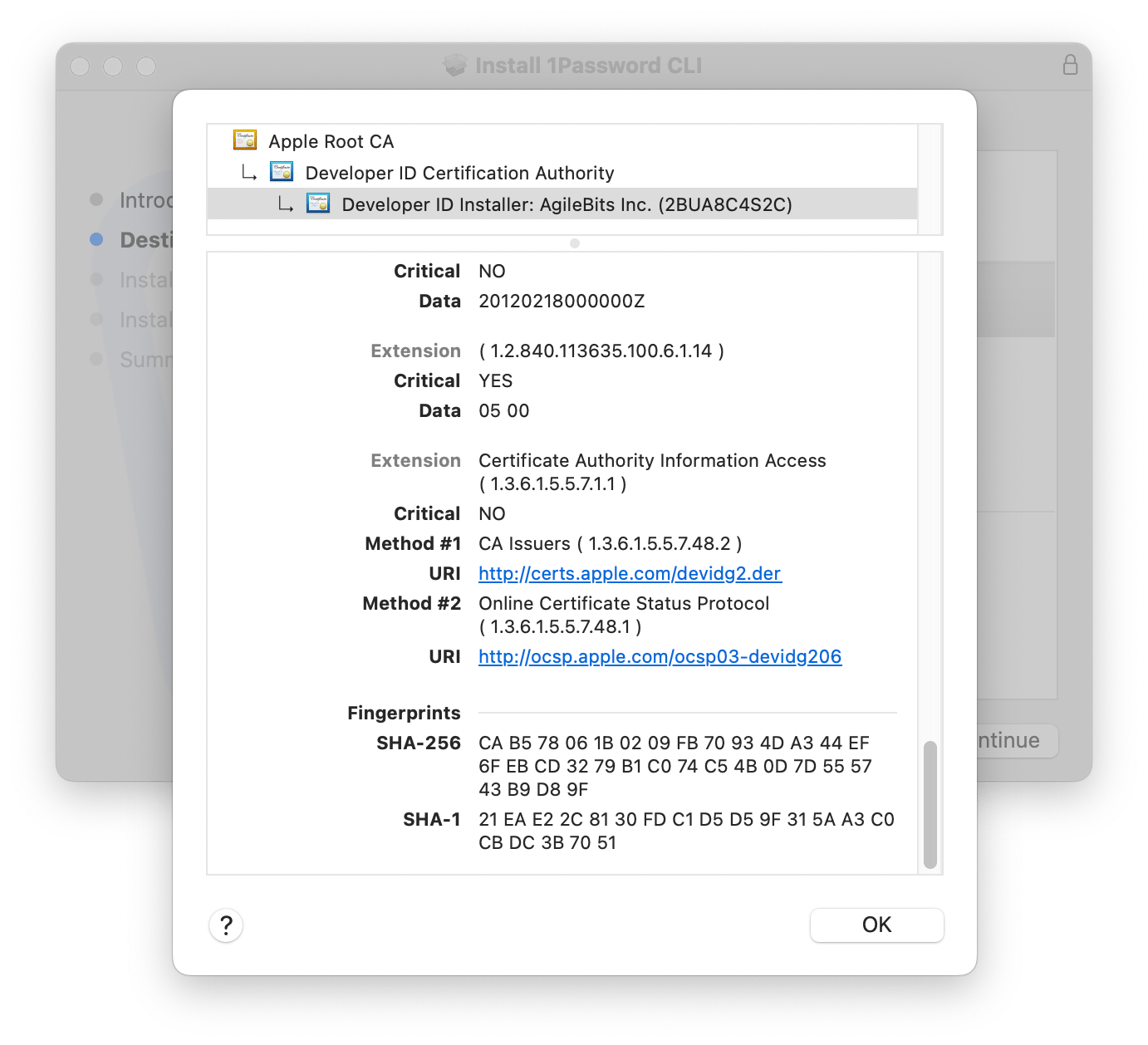
- Select the lock icon in the top right corner of the installer window. If you don’t see the lock icon, the package is unsigned, and you shouldn’t install it.
- Select Developer ID Installer: AgileBits Inc. (2BUA8C4S2C). If you see a different developer ID, or the certificate doesn’t have a green checkmark indicating that it’s valid, don’t install the package.
- Select the triangle next to Details and scroll down.
- Make sure that the SHA-256 fingerprint in the installer matches one of the following fingerprints. If they match, the signature is verified. Select OK and continue installation.
The installer automatically verifies the files in the package. If any file has an issue, installation stops without changes to your system, and you’ll see a message that the installer encountered an error.