

op read, op run, or op inject.
Requirements
Before you can use secret references to securely load your secrets with 1Password CLI, you’ll need to:- Sign up for 1Password.
- Install 1Password CLI.
- Save the secrets you want to reference in your 1Password account.
Step 1: Get secret references
You can get secret references in several ways:- With the 1Password desktop app: Copy secret references from the app.
- With 1Password for VS Code: Insert secret references from 1Password as you edit code.
- With 1Password CLI: Get secret references for one or multiple fields with
op item get. - With the secret reference syntax: Write secret references manually.
Step 2: Replace plaintext secrets with secret references
After you create secret references, use them in place of plaintext secrets in your code. The example below shows a GitHub environment file with a secret reference pointing to where the GitHub Personal Access Token is stored in 1Password rather than a plaintext token.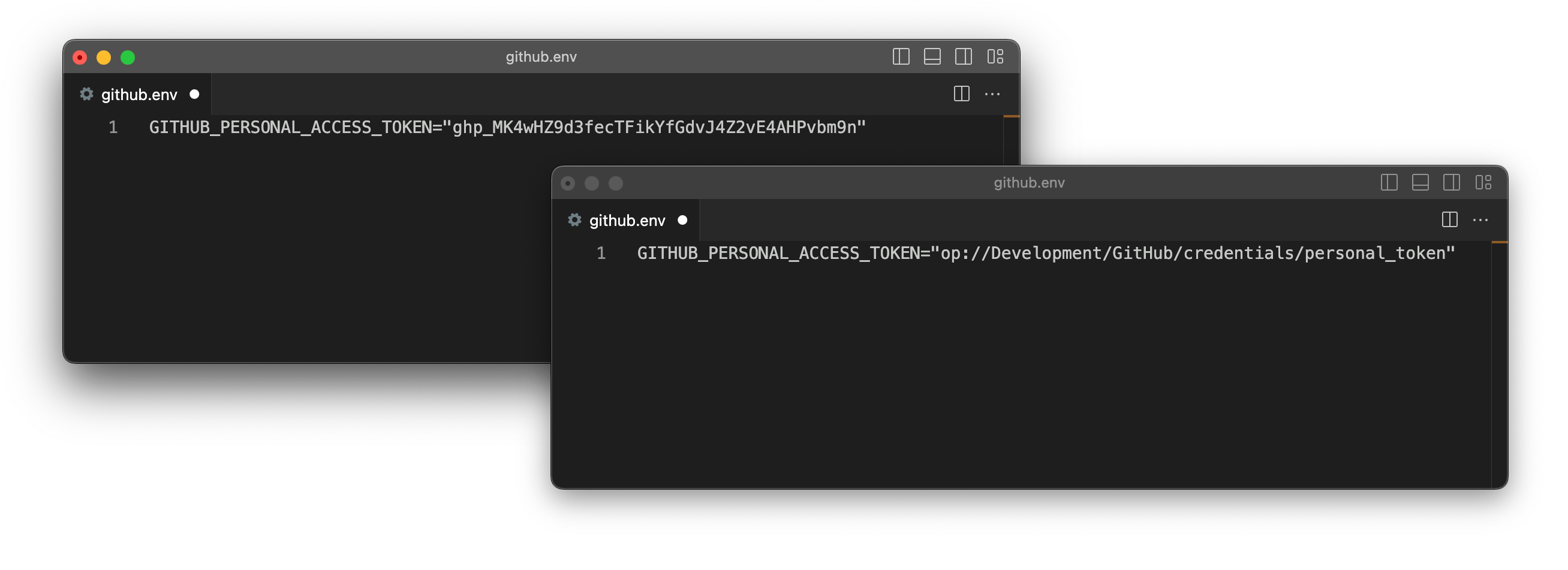
Step 3: Resolve secret references
There are three ways you can replace secret references with the actual secrets they reference at runtime:- Use
op readto write secrets tostdoutor to a file. - Use
op runto pass secrets as environment variables to a process. - Use
op injectto inject secrets into configuration files or scripts.
With op read
You can use op read with a secret reference to print the secret to stdout.
To write the secret to a file instead of stdout, include the --out-file flag (or -o) with the path to the new file. For example, to create a file token.txt that contains the GitHub personal access token:
token.txt
op read with secret references to load secrets into scripts. For example, to use secret references in place of your Docker username and password with the docker login command:
myscript.sh
Query parameters
You can use secret references with query parameters to get more information about an item. To get information about item fields or file attachments, include theattribute (or attr) query parameter with the attribute you want to get.
type, value, title, id, purpose, otp
And the following attributes for file attachments:
content, size, id, name, type.
For example, to retrieve a one-time password from the one-time password field on a GitHub item:
To get an SSH key’s private key in the OpenSSH format, include the ssh-format query parameter with the value openssh on a secret reference for the SSH key’s private key field.
Next stepLearn more about securely loading secrets into scripts.
With op run
You can set environment variables to secret references, then use op run to pass secrets to an application or script at runtime.
op run scans environment variables for secret references, loads the corresponding values from 1Password, then runs the provided command in a subprocess with the secrets made available as environment variables for the duration of the subprocess.
When you reference a variable like
$MY_VAR in the same command where you call op run, your shell expands $MY_VAR before op run can substitute the secret reference. To make sure op run substitutes the secret before the variable expands, you can either:-
Export the variable as a secret reference before calling
op run, or -
Set the variable in the same command as
op run, then run the command to expand the variable in a subshell. For example:
Pass the secrets to an application or script
To pass secrets to your script or application at runtime, wrap the command withop run.
For example, here’s a Node.js app that needs credentials to connect to a database:
DB_USER and DB_PASSWORD environment variables to secret references:
- Bash, Zsh, sh
- fish
- PowerShell
op run to pass the secrets to the node app.js command:
Use with environment files
You can also useop run with environment files. To do this, use secret references instead of plaintext secrets in your environment file:
node.env
op run with the --env-file flag:
Print a secret with or without masking
If a subprocess used withop run prints a secret to stdout, the secret will be concealed by default. You can include the --no-masking flag to print the value.
- Bash, Zsh, sh
- fish
- PowerShell
To export an example environment variable Use
DB_PASSWORD to a secret reference:op run with the printenv command to print the concealed secret:Include the --no-masking flag to print the actual secret:Next stepLearn more about loading secrets into the environment with
op run, including how to use template variables to switch between different sets of secrets for different environments.With op inject
You can use op inject to replace secret references in a script or file with the secrets they reference.
By default, op inject accepts input on stdin and outputs on stdout. You can use the --in-file flag (or -i) to read the input from a file instead, and the --out-file flag (or -o) to specify where the ouput should be written.
To use op inject to resolve a secret in a simple command:
To write the output to a file token.txt in the current directory:
token.txt
Use with configuration files
You can useop inject to pass in a configuration file templated with secret references and output a configuration file that contains resolved secrets. Configuration files that use secret references instead of plaintext secrets can be safely checked into Git.
config.yml.tpl
Next stepLearn more about loading secrets into configuration files with
op inject, including how to use template variables to switch between different sets of secrets for different environments.