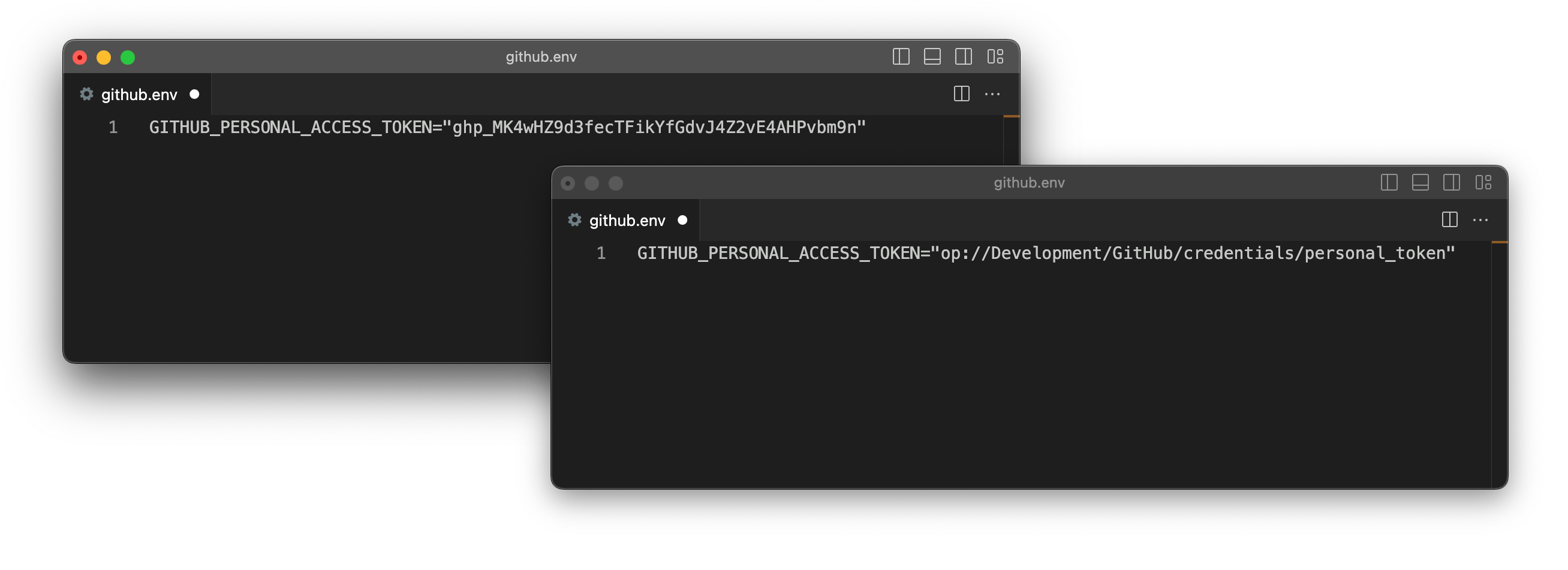
An environment file using a plaintext secret and the same file using a secret reference.
Secret reference URIs point to where a secret is saved in your 1Password account using the names (or unique identifiers) of the vault, item, section, and field where the information is stored.
op://<vault-name>/<item-name>/[section-name/]<field-name>
Secret references remove the risk of exposing plaintext secrets in your code and reflect changes you make in your 1Password account, so when you run a script you get the latest value. You can use secret references with:

1Password CLI

Load secrets into environment variables, configuration files, and scripts.

1Password SDKs

Programmatically access your secrets with Go, JavaScript, and Python.

Secrets Automation

Use secret references to secure your secrets management workflows.

VS Code

Create, preview, and read secret references in your code.

1Password integrations

Securely access your secrets in Kubernetes, CircleCI, GitHub Actions, Jenkins, Terraform, Pulumi, Postman, and more.

Get secret references

With the 1Password desktop app

To see the option to copy secret references in the 1Password desktop app, first turn on the integration with 1Password CLI. Then:
  1. Open the item where the secret you want to reference is stored.
  2. Select next to the field that contains the secret you want to reference, then select Copy Secret Reference.
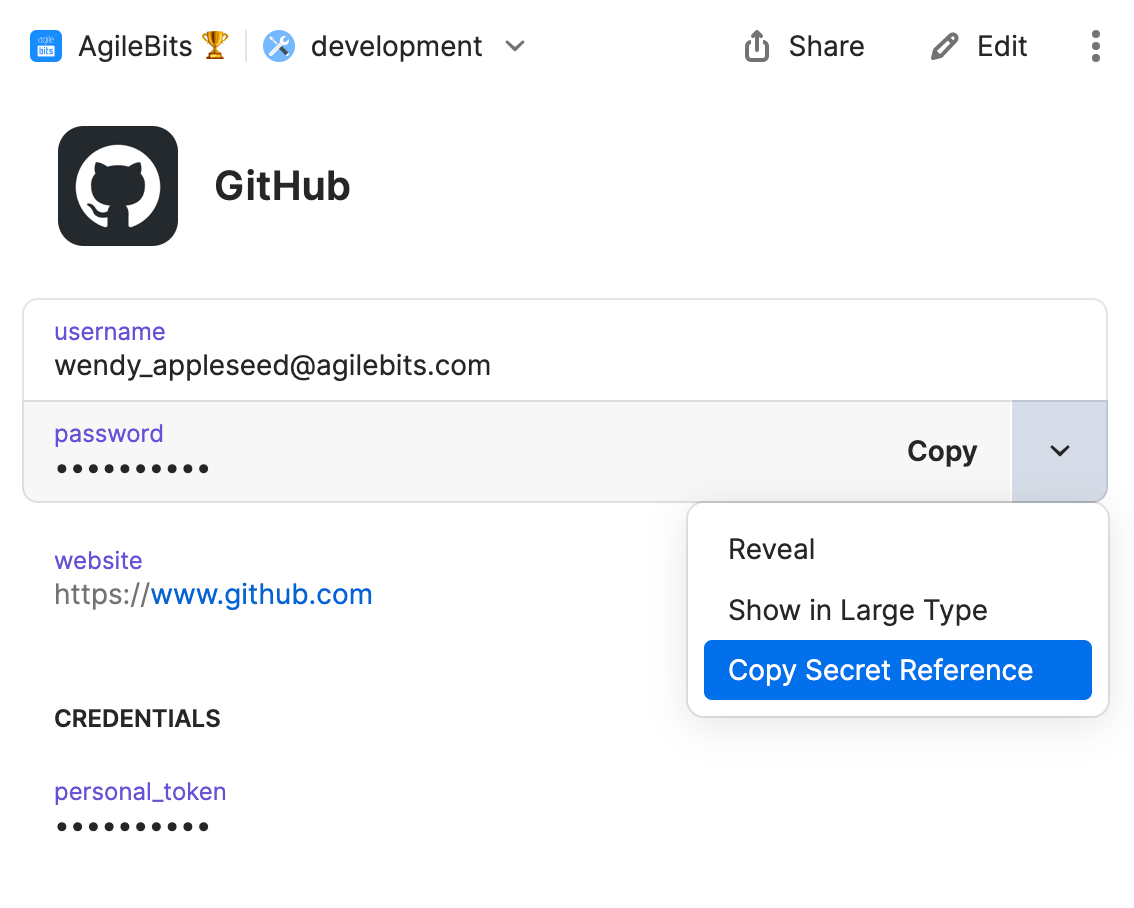
An item in 1Password with the Copy Secret Reference option selected.

With 1Password for VS Code

You can use 1Password for VS Code to insert secret references from 1Password as you edit your code. First, install the extension. Then:
  1. Open the Command Palette .
  2. Enter 1Password: Get from 1Password.
  3. Enter the item name or ID.
  4. Select the field to use.

With 1Password CLI

To get a secret reference with 1Password CLI, run op item get with the --format json flag and include the --fields flag to specify a field label. Then use jq to retrieve the secret reference from the JSON output. For example: To get secret references for every field on an item, use op item get with the --format json flag without specifying a field.
op item get GitHub --format json
Each field object will include a reference key that contains its secret reference. For the example GitHub item, the output looks like this:
  "fields": [
    {
      "id": "username",
      "type": "STRING",
      "purpose": "USERNAME",
      "label": "username",
      "value": "wendy_appleseed@agilebits.com",
      "reference": "op://development/GitHub/username"
    },
    {
      "id": "password",
      "type": "CONCEALED",
      "purpose": "PASSWORD",
      "label": "password",
      "value": "GADbhK6MjNZrRftGMqto",
      "entropy": 115.5291519165039,
      "reference": "op://development/GitHub/password",
      "password_details": {
        "entropy": 115,
        "generated": true,
        "strength": "FANTASTIC"
      }
    },
    {
      "id": "notesPlain",
      "type": "STRING",
      "purpose": "NOTES",
      "label": "notesPlain",
      "reference": "op://development/GitHub/notesPlain"
    },
    {
      "id": "5ni6bw735myujqe4elwbzuf2ee",
      "section": {
        "id": "hv46kvrohfj75q6g45km2uultq",
        "label": "credentials"
      },
      "type": "CONCEALED",
      "label": "personal_token",
      "value": "ghp_WzgPAEutsFRZH9uxWYtw",
      "reference": "op://development/GitHub/credentials/personal_token"
    }
  ]
}

Syntax rules

Supported characters

Secret references are case-insensitive and support the following characters:
  • alphanumeric characters (a-z, A-Z, 0-9)
  • -, _, . and the whitespace character
If a secret reference includes a whitespace, enclose the secret reference in quotation marks. For example:
op read "op://development/aws/Access Keys/access_key_id"
Any part of a secret reference that includes an unsupported character must be referred to by its unique identifier (ID) instead of its name. To get an ID, run op item get with the output set to JSON. For example, to get the ID for a custom text field named test/:

File attachments

To reference a file attachment, use the file name in place of a field name:
op://vault-name/item-name/[section-name/]file-name

Externally-set variables

If you use different sets of secrets in different environments, you can include variables within secret references and then set the variable to switch between secrets. For example, the APP_ENV variable in the example below can be set to dev to load development credentials or prod to load production credentials, assuming the credentials are stored in 1Password vaults named dev and prod.
app.env
MYSQL_DATABASE = "op://$APP_ENV/mysql/database"
MYSQL_USERNAME = "op://$APP_ENV/mysql/username"
MYSQL_PASSWORD = "op://$APP_ENV/mysql/password"
Learn how to use variables to switch between sets of secrets in environment files and config files.

Field and file metadata attributes

You can use secret references with query parameters to get more information about an item.

Attribute parameter

To get information about item fields and file attachments, use the attribute (or attr) query parameter.
Fields
op://<vault>/<item>[/<section>]/<field-name>?attribute=<attribute-value>
File attachments
op://<vault>/<item>[/<section>]/<file-name>?attribute=<attribute-value>
Field attributes:
AttributeDefinition
typeThe field’s type
valueThe field’s content
idThe field’s unique identifier
purposeThe designation of a built-in field (can be “username”, “password”, or “notes”)
otpUse with one-time password fields to generate a one-time password code
File attachment attributes:
AttributeDefinition
typeThe field’s type
contentThe file attachment’s content
sizeThe size of the file attachment
idThe file attachment’s unique identifier
nameThe name of the file attachment
For example, to retrieve an item’s one-time password code: To retrieve a field’s type: To retrieve the name of a file attachment:

SSH format parameter

To get an SSH private key in the OpenSSH format, include the ssh-format query parameter with the value openssh on a secret reference for the SSH key’s private key field.

Secret reference examples

A field inside a section

To create a secret reference that refers to the PagerDuty email field, which is within the Admin section, use:
op://Management/PagerDuty/Admin/email
  • Management refers to the vault where the item is saved
  • PagerDuty refers to the item
  • Admin refers to the section where the field is a part of
  • email refers to the field where the secret you want to reference is located
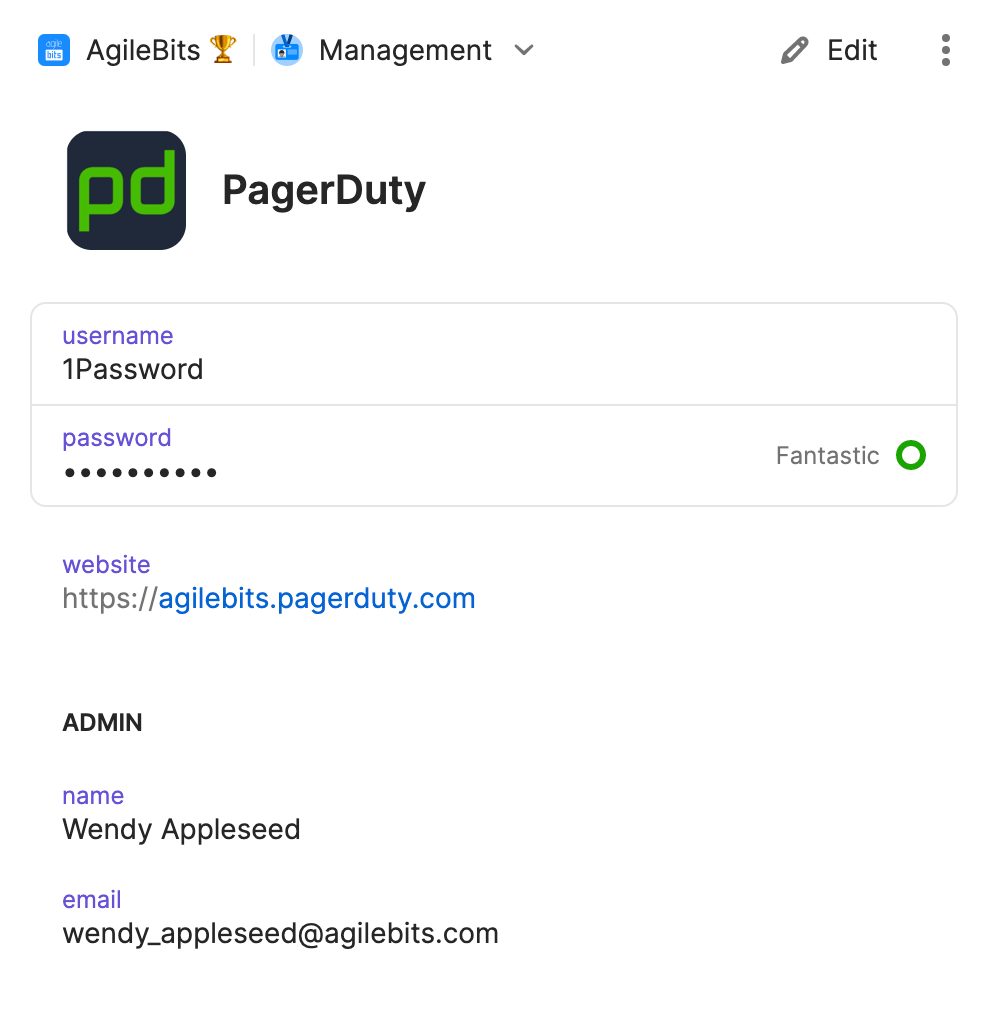
PagerDuty 1Password item

A field without a section

To create a secret reference for the Stripe publishable-key field, which is not part of a section, use:
op://dev/Stripe/publishable-key
  • dev refers to the vault where the item is saved
  • Stripe refers to the item
  • publishable-key refers to the field where the secret you want to reference is located
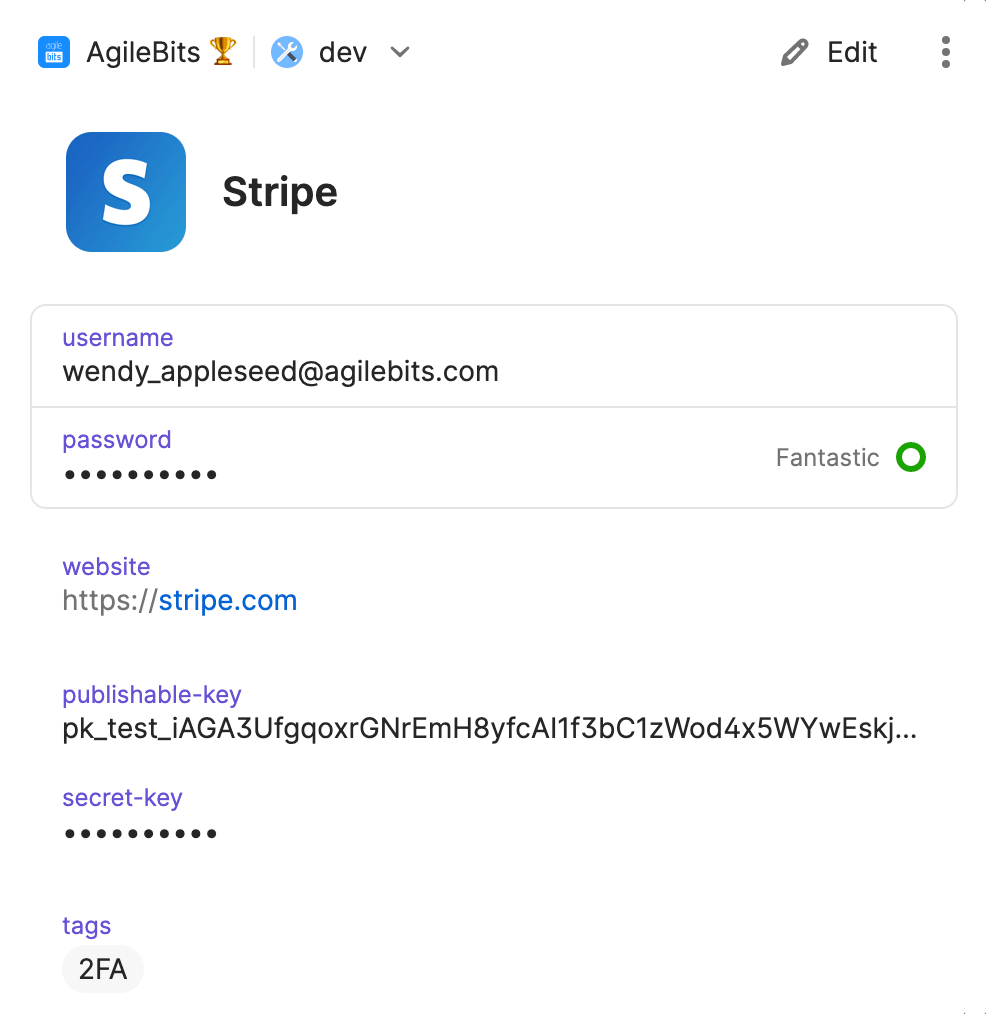
Stripe 1Password item

Learn more