

- 1Password Business
- 1Password Teams
- 1Password Families
1Password Business includes the following permissions:In order to move an item, a user must have access to both the vault where an item is located and the destination vault.Permission dependencies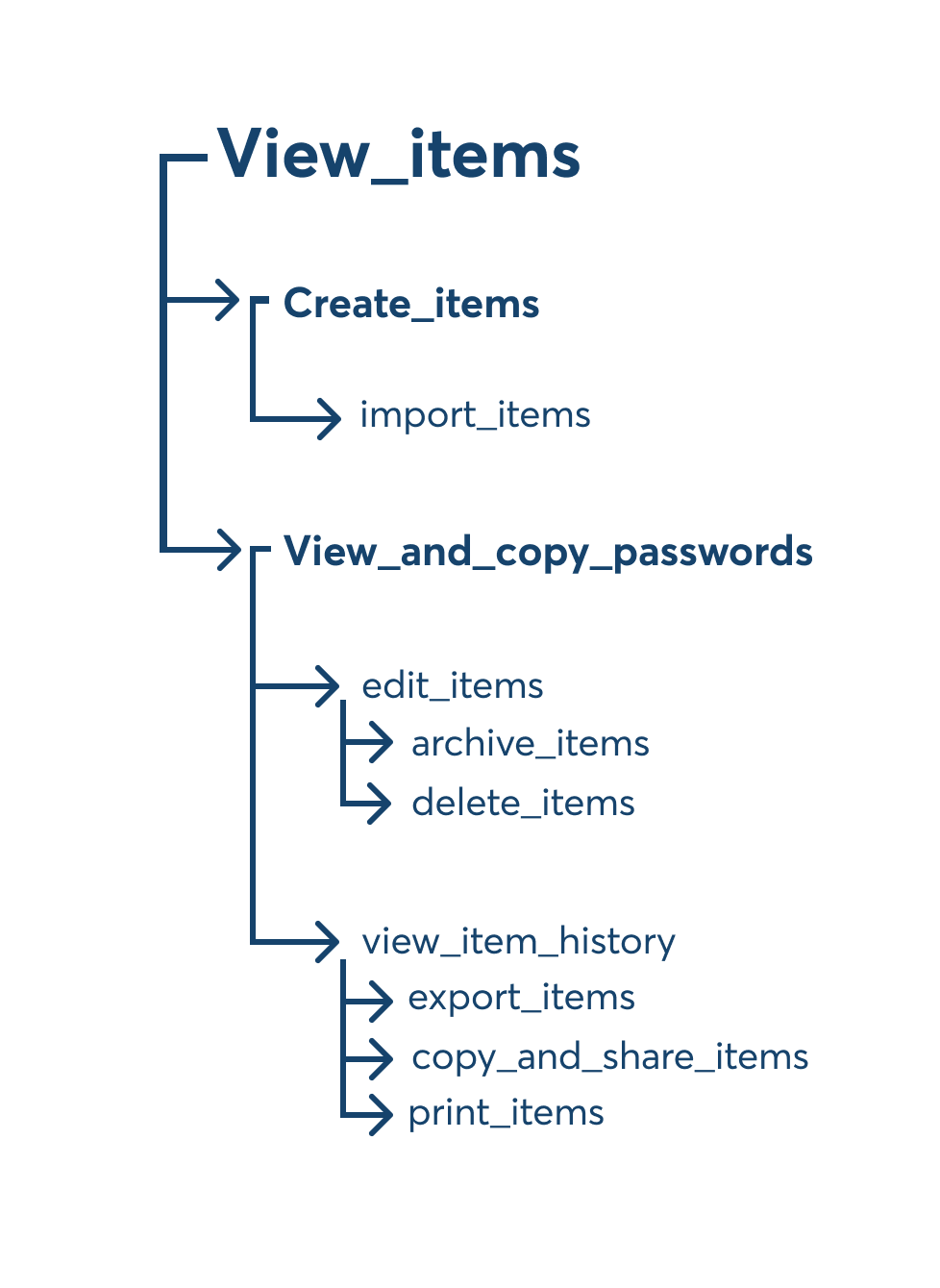
- view_items: view items in a vault.
- create_items: create items in a vault.
- edit_items: edit items in a vault.
- archive_items: archive items in a vault.
- delete_items: delete items in a vault.
- view_and_copy_passwords: view concealed passwords and copy them to the clipboard.
- view_item_history: view and restore previous versions of items in the vault.
- import_items: move or copy items into the vault.
- export_items: save items in the vault to an unencrypted file that other apps can read.
- copy_and_share_items: copy items between vaults, or share them outside of 1Password.
- print_items: print the contents of items in the vault
- manage_vault: allows a team member to grant and revoke access to the vault, change permissions for others, and delete the vault. Owners will always have permission to manage vaults.
- allow_viewing: view items in a vault, view concealed passwords and copy them to the clipboard.
- Includes the granular permissions:
view_items,view_and_copy_passwords,view_item_history.
- Includes the granular permissions:
- allow_editing: create, edit, move, print, copy, archive, and delete items in the vault.
- Includes the granular permissions:
create_items,edit_items,archive_items,delete_items,import_items,export_items,copy_and_share_items,print_items.
- Includes the granular permissions:
- allow_managing: grant and revoke access to the vault, change permissions for others, and delete the vault. Owners will always have permission to manage vaults.
- Includes the granular permission:
manage_vault.
- Includes the granular permission:
move_items is automatically added when the permissions below are all added:In 1Password Business, all vault permissions have a hierarchical relationship in which narrower permissions require broader permissions to be granted alongside them. Permission dependencies are cumulative, so if a narrower permission is several levels down, it requires all of the broader permissions above it.
For example, to grant the narrower permission delete_items you must also grant the permissions edit_items, view_and_copy_passwords, and view_items.
Similarly, to revoke a broader permission like view_items, any narrower dependent permissions that have already been granted must be revoked alongside it.